Add a mosque's prayer times or events to your calendar
In short
On a mosque's web page, tap Add to calendar under Prayer Timings to download its daily Iqaamah times as a calendar file, or Add to calendar under an event. Download again when times change.
On this page
On the Salah Locator website, every mosque that has published a timetable has an 📅 Add to calendar link under its prayer times. It downloads the mosque's daily Iqaamah times as a calendar (.ics) file that Google Calendar, Apple Calendar, Outlook and most other calendar apps can import. Each upcoming event on a mosque's page has its own Add to calendar link too.
Add a mosque's daily prayer times
- Open the mosque's page on sl.abdohoo.app.
- Under Prayer Timings, tap 📅 Add to calendar. A calendar file ending in prayer-times.ics downloads.
- Import it into your calendar:
- Apple Calendar (iPhone, iPad or Mac): open the downloaded file and choose which calendar to add it to.
- Google Calendar: on a computer, open calendar.google.com, go to Settings → Import & export → Import, choose the file and a calendar.
- Outlook: open the file, or use File → Open & Export → Import/Export in the desktop app.
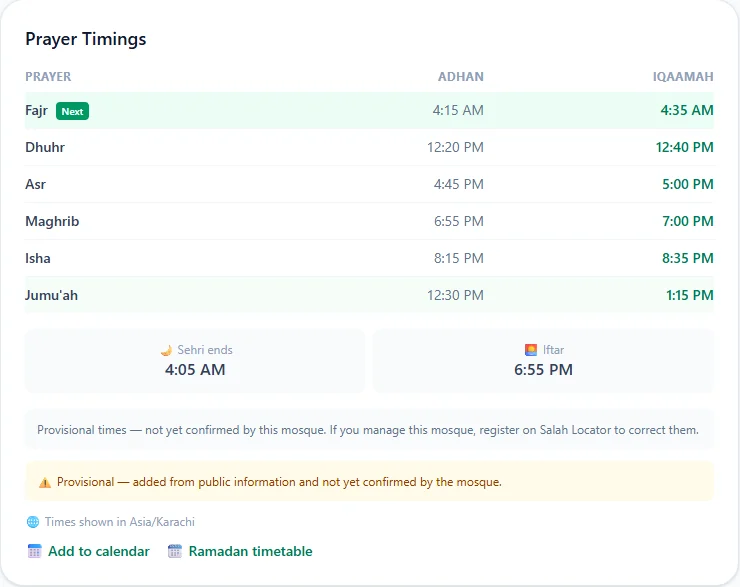
Each prayer that has an Iqaamah time becomes an event that repeats every day, titled like Fajr Iqaamah — Badshahi Mosque, with the mosque's address as the location.
What the file includes, and what it doesn't
| Included | Not included |
|---|---|
| The five daily Iqaamah times from the mosque's regular timetable | Adhan times |
| The mosque's address | Jumuʼah times |
| Ramadan or other seasonal timetables | |
| Later changes the mosque makes |
The file is a copy of the timetable on the day you download it; your calendar won't update when the mosque changes its times. Delete the old events and download again when that happens. The times are written as plain clock times without a time zone, so your calendar shows them at the same clock time wherever you are.
For times that follow the mosque automatically, use prayer reminders in the app instead: they move when the mosque changes a time.
Add a single event
Under Upcoming Events on a mosque's page, each event has an 📅 Add to calendar link. It downloads that one event with its start time, end time (one hour if the mosque didn't set an end) and location. Import it the same way.
Print a timetable instead
If you'd rather have paper, tap 🗓 Ramadan timetable under Prayer Timings. It shows a day-by-day table for the mosque's current seasonal timetable, or this month, and has a 🖨 Print button. See Jumuʼah, Ramadan, Tarawih and Eid times.
Is there a public API?
No. Salah Locator's API exists to serve its own app and is not open to third-party clients: every request needs a token that the app obtains when it is installed. If you have a genuine integration in mind, such as a display board in a mosque or a community website, email support@abdohoo.app and explain what you'd like to build rather than scraping the site.
Mosque administrators can keep their own listing current from the dashboard, which is the most reliable way to get accurate times onto every device; see Update your mosque's prayer timings.
Frequently asked questions
Will my calendar update when the mosque changes its times?
No. The file is a copy of the timetable on the day you download it. When the mosque changes its times, delete the old events and download the file again.
Does the calendar file include Jumuʼah and Ramadan times?
No. It contains the five daily Iqaamah times from the mosque's regular timetable. Check the mosque page for Jumuʼah and for any seasonal timetable in force.
Can I add prayer times to Google Calendar on my phone?
The Google Calendar app can't import files directly. Open calendar.google.com in a browser, go to Settings, then Import & export, and import the file there. It then appears on your phone.
Is there a public API for Salah Locator data?
No. The API exists to serve the Salah Locator app and is not open to third-party clients. If you have a genuine integration in mind, such as a mosque display board, contact support@abdohoo.app rather than scraping the site.
Was this article helpful?
Related articles
- Find the Qibla with the Salah Locator compass and calibrate itOpen the Qibla finder from the compass icon on Find or from Profile, allow location, and turn until the arrow reaches the top marker. If it asks, calibrate by moving the phone in a figure-8.
- Read a mosque's timetable: Adhan, Iqaamah and estimated timesAdhan is the call to prayer; Iqaamah is when the congregation stands. A note under each timetable says whether the times come from the mosque, a correction or a calculation.
- See a mosque's announcements, events and live streamsOpen the mosque's page: live streams, announcements (pinned first) and upcoming events sit below the timetable. Save the mosque to be notified when it posts something new.
- Use Salah Locator offline: what works without a connectionMosque pages you've opened stay on your phone for up to 30 days, alarms are scheduled on the device and the Qibla finder works from GPS. Pray Now and new searches need a connection.
Need a hand?
Email us what you see on screen — a screenshot helps — and we'll walk you through it.