Read a mosque's timetable: Adhan, Iqaamah and estimated times
In short
Adhan is the call to prayer; Iqaamah is when the congregation stands. A note under each timetable says whether the times come from the mosque, a correction or a calculation.
On this page
Every mosque timetable in Salah Locator has two columns. Adhan is the time of the call to prayer, when the prayer's time begins. Iqaamah is the time the congregation stands to pray, which is the time to aim for if you want to join the jamaʼah. Under the table, a short note tells you whether the times were published by the mosque, include a correction from someone who prays there, are provisional, or are only an estimate.
The Adhan and Iqaamah columns
Open any mosque from Find, Browse, Pray Now or Saved. The timetable lists Fajr, Dhuhr, Asr, Maghrib and Isha, with the Adhan time in the middle column and the Iqaamah time on the right. The website highlights the next prayer with a Next badge.
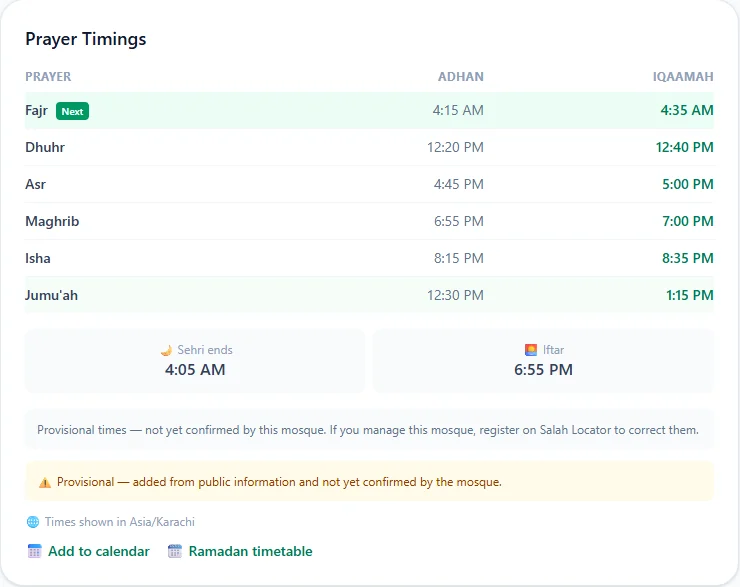
A few other details:
- Jumuʼah has its own row. If the mosque holds a second congregation, the website shows both Iqaamah times (for example 1:15 PM / 2:00 PM) and the app adds a Jumuʼah 2 row.
- Times shown in tells you the mosque's time zone. Every mosque's times are shown in its own local time, so a mosque abroad shows its real local Iqaamah.
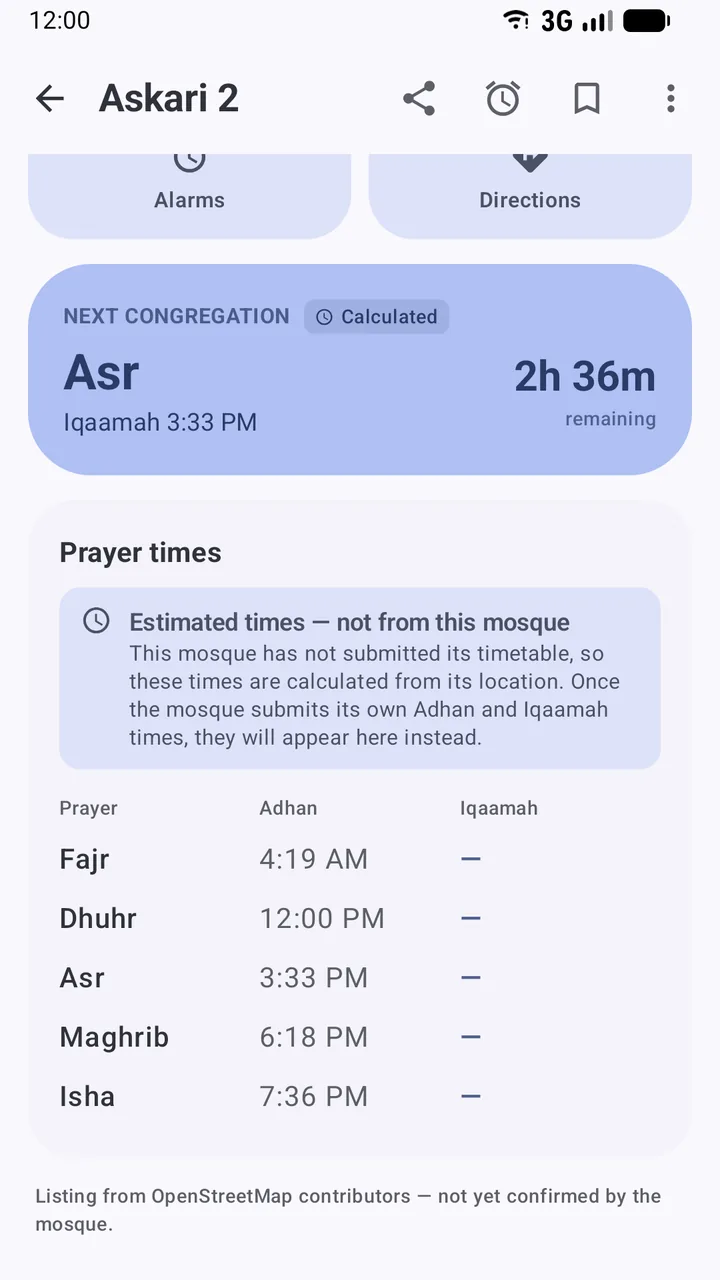
- The dark bar above the table on the website counts down to the Next Iqaamah and shows today's Hijri date. In the app, the NEXT CONGREGATION card does the same.
- Sehri ends and Iftar appear under the table. See Jumuʼah, Ramadan, Tarawih and Eid times.
Where the times come from
Salah Locator tells you who stands behind each timetable, because a time the imam entered and a guess look identical otherwise.
| What you see | What it means |
|---|---|
| Published by the mosque. (a tick in the app) | The mosque's own administrator entered these times. |
| Includes a correction sent by someone who prays here and accepted. | Someone from the congregation reported a wrong time and the mosque accepted the fix. |
| Provisional — added from public information and not yet confirmed by the mosque. (a warning triangle) | The timetable was added to the directory from public information. Treat it with care. |
| Estimated times — not from this mosque (app only) | The mosque hasn't published a timetable, so the app has calculated the times. |
Below that, Confirmed shows when the times were last saved by the mosque. If that was about six months ago or more, the note changes to Last confirmed … — the times may have changed since.
Estimated times when a mosque hasn't published
Many mosques in the directory were added from OpenStreetMap and haven't published a timetable yet. The website shows Timings have not been published yet. The app goes a step further and calculates the Adhan times from the mosque's location, behind a clear notice and a Calculated badge on the countdown. The Iqaamah column shows a dash, because only the mosque knows when its congregation stands.
Change the calculation method or Asr setting
Estimated times depend on the convention used for Fajr, Isha and Asr. To match what your community follows:
- Open Profile and scroll down to Calculation method.
- Tap one of Muslim World League (the default), ISNA (North America), Egyptian Authority, Umm al-Qura (Makkah), Karachi or Tehran.
- Under Asr method, choose Standard (Shafi) or Hanafi. The Hanafi Asr is later, because it waits until an object's shadow is twice its length.
The change applies at once to estimated times on mosque pages and on the home-screen widget. It never changes times a mosque has published. Schools of thought differ on these conventions, so follow your local mosque or a scholar you trust; How prayer times are calculated explains the differences.
Spot a wrong time?
If you pray at a mosque and its listing is wrong, tell it:
- In the app, open the mosque and tap the three-dot menu at the top right.
- Choose Report a wrong prayer time (you will be asked to sign in).
- Pick Which prayer?, then Adhan or Iqaamah?, and enter The correct time. Add a note if it helps, for example that the time changed after Ramadan.
- Tap Submit report. The mosque is asked to confirm it, and nothing changes until they do.
On the website, use ⚑ Report under Something wrong with this listing? at the bottom of the mosque page and choose Wrong or misleading prayer times / mosque details. Moderators review reports, usually within 48 hours.
To be reminded before the congregation starts, see Set up prayer reminders. For the difference between the two calls in more depth, read Adhan vs Iqamah.
Frequently asked questions
What is the difference between the Adhan and Iqaamah times?
The Adhan time is when the call to prayer is made and the prayer's time begins. The Iqaamah time is when the congregation actually stands to pray, usually some minutes later. If you want to pray in congregation, aim to arrive before the Iqaamah.
Why does a mosque show times with no Iqaamah?
When a mosque has not published its timetable, the app estimates the Adhan times from the mosque's location and shows a notice saying so. No calculation can know when a congregation stands, so the Iqaamah column stays empty until the mosque publishes its own times.
Does changing the calculation method change a mosque's published times?
No. The calculation method and Asr setting only affect estimated times for mosques that have not published a timetable. Times a mosque publishes are always shown exactly as the mosque entered them.
Which calculation method should I choose?
Choose the convention your local mosque or community follows. If you are not sure, ask your imam. The default is Muslim World League with the Standard Asr.
What do I do if a prayer time is wrong?
In the app, open the mosque, tap the three-dot menu and choose Report a wrong prayer time. The mosque is asked to confirm the correction, and nothing changes until it does.
Was this article helpful?
Related articles
- Use Salah Locator offline: what works without a connectionMosque pages you've opened stay on your phone for up to 30 days, alarms are scheduled on the device and the Qibla finder works from GPS. Pray Now and new searches need a connection.
- Add the Salah Locator prayer times widget to your home screenLong-press your home screen, open Widgets, drag out Salah Locator's Prayer times widget, pick a mosque and a theme, and tap Add widget. It shows the next prayer and today's five times.
- Set up prayer reminders and fix alarms that don't ringOpen a mosque, tap Alarms, choose Adhan or Iqaamah and switch on the prayers you want. If reminders are late or silent, allow exact alarms and notifications and lift battery limits.
- Find Jumuʼah, Ramadan, Tarawih and Eid prayer timesJumuʼah has its own row in each mosque's timetable. In Ramadan a mosque can switch to a seasonal timetable and publish Sehri, Iftar, Tarawih and Eid times, which appear as the dates approach.
Need a hand?
Email us what you see on screen — a screenshot helps — and we'll walk you through it.