See a mosque's announcements, events and live streams
In short
Open the mosque's page: live streams, announcements (pinned first) and upcoming events sit below the timetable. Save the mosque to be notified when it posts something new.
On this page
Everything a mosque posts is on its page in Salah Locator. Open the mosque, and below the prayer timetable you'll find its live streams, announcements (pinned ones first) and upcoming events. To hear about new posts without checking, save the mosque: you'll then get a notification and an email each time it publishes an announcement or event.
On the website
Open a mosque's page. A bar of shortcuts under the countdown jumps to each section: 🕌 Prayer Times, 📢 Announcements, 📅 Events, and where the mosque has them, 👥 Committee, 🖼 Gallery and 🧭 Location.
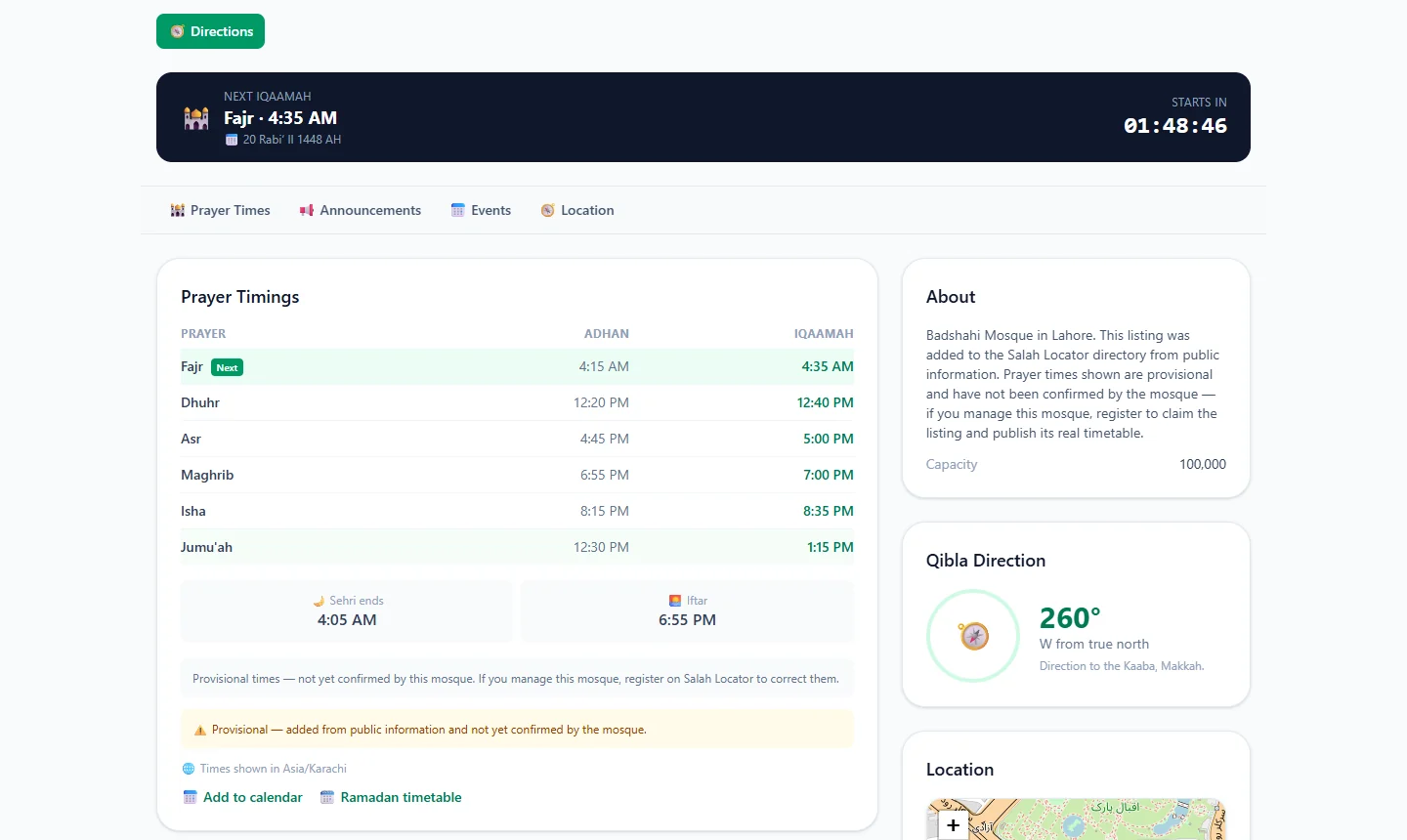
- Announcements shows the latest posts. Pinned ones stay at the top; each shows its date, and any pictures open larger when tapped. No announcements right now. means the mosque hasn't posted any.
- Upcoming Events lists events that haven't happened yet, with the date, time and place. If the mosque added a video, it plays on the page. Tap 📅 Add to calendar to download the event for your calendar app.
- Live now appears as a red button at the top of the page while one of the mosque's streams is on air, and the player sits above the timetable. Streams that aren't live right now are listed under Broadcast schedule with their days and times.
YouTube, Facebook and Vimeo streams play on the page. Links to other platforms open in a new tab.
In the Android app
Open the mosque and scroll down past the timetable. Depending on what the mosque has published, you'll see:
- Live streams, marked ● LIVE while on air. Tap one to open it.
- Announcements, pinned ones marked Pinned. Tap a picture to see it full size.
- Upcoming events, with the date and time.
- 🌙 Tarawih and Eid Prayers in season, plus Gallery, Facilities and Committee.
A mosque's page, including its announcements, stays readable offline once you have opened it.
The rest of a mosque's page
Further down, a mosque may also show:
- About: a description, the imam's name, capacity and a contact email.
- Committee: the people who run the mosque, with their roles, and a phone number where they have agreed to share one.
- Gallery: photos of the mosque. Tap one to see it larger.
- Facilities, such as parking, a wudu area, a women's section or wheelchair access.
- Location: a map with the mosque's pin, and a Directions button at the top of the page for route directions to the mosque.
What appears depends on what the mosque's administrator has filled in, so a listing that was only recently added may show little more than its timetable and map.
Get notified of new posts
- Sign in.
- Save the mosque with the bookmark (app) or star (website).
- New announcements and events now appear under Notifications, reached from the bell at the top of Find in the app or at the top of the website, and are emailed to you.
Drafts and edits to existing posts don't send notifications; only newly published announcements and events do.
Something inappropriate?
Every announcement, event and gallery photo has a Report option. Choose a reason, such as Spam, scam or advertising or Hate speech or harassment, and add a note if it helps. You don't need an account to report. Moderators review reports, usually within 48 hours, under the site's content policy.
To put the week's events in your diary, see Add prayer times or events to your calendar. Run a mosque? Post announcements, events and live streams explains the other side.
Frequently asked questions
How do I get notified when my mosque posts an announcement?
Sign in and save the mosque. Saving follows it, so new announcements and events appear in your Notifications and are sent to your email.
Can I watch a mosque's Jumuʼah khutbah live?
If the mosque has added a live stream, yes. On the website a Live now button appears while it is on air, with the player on the page; in the app, tap the stream under Live streams.
Can I add a mosque event to my calendar?
Yes. On the website, tap Add to calendar under the event to download it as a calendar file.
How do I report an inappropriate announcement?
Use the Report link under the announcement or event. Moderators review reports, usually within 48 hours.
Was this article helpful?
Related articles
- Find the nearest mosque and change the search radiusOn the website, tap Use my location and choose 5, 10, 15 or 25 km; results are sorted by distance and can be shown on a map. In the app, Find lists mosques within 15 km of you.
- Post announcements, events and live streams for your mosqueIn Manage Mosque, open Announcements, Events or Live Streams, tap + New, fill in the form and save. A new announcement or event that is published straight away notifies everyone who saved your mosque.
- Use Pray Now to catch a congregation near youPray Now picks the current prayer and lists nearby mosques whose Iqaamah is still ahead, soonest first, highlighting the earliest one and the one that gives you most time to get there.
- Save your favourite mosques and follow their updatesSign in, then tap the bookmark on a mosque in the app or the star on the website. Saved mosques appear under Saved on both, and you are notified of their new announcements and events.
Need a hand?
Email us what you see on screen — a screenshot helps — and we'll walk you through it.