Update your mosque's prayer timings, Ramadan and Eid times
In short
Open Manage Mosque → Prayer Timings on the website, or My mosques → your mosque → Prayer timings in the app, enter Adhan and Iqaamah for each prayer and Jumuʼah, and save. Changes show at once.
On this page
To update your mosque's times, sign in and open Manage Mosque → Prayer Timings on the website, or Profile → My mosques, your mosque, then Prayer timings in the Android app. Enter the Adhan and Iqaamah for each prayer and for Jumuʼah, and save. The new times appear on your public page at once, and worshippers who set reminders on your mosque have them moved to the new times automatically.
Update the daily timetable on the website
- Sign in at sl.abdohoo.app and open Dashboard.
- In the sidebar, choose Manage Mosque, then the Prayer Timings tab. If you run several mosques, switch to the right one first.
- For each of Fajr, Dhuhr, Asr, Maghrib and Isha, enter the Adhan and Iqaamah times.
- Under Jumu'ah (Friday), enter the Adhan and the 1st Iqaamah, and a 2nd Iqaamah if you hold a second congregation.
- Use Notes for anything worshippers should know, for example a one-off change this week. It is shown under the timetable.
- Tap Save timings.
Update it in the app
- Open Profile → My mosques and tap your mosque. The management screen opens.
- Tap Prayer timings.
- Enter each time in 24-hour format (HH:MM), or tap Pick to choose it. Leave a field blank to clear it.
- Fill in Second Jumuah Iqaamah (optional) and Notes (optional) if needed.
- Tap Save timings.
What your congregation sees
Once saved, your timetable is labelled Published by the mosque., with a note of when it was last confirmed. Saving the screen counts as confirming all the times on it, even the ones you didn't change. If six months or so pass without a save, the page says Last confirmed … — the times may have changed since, so re-save whenever you check the times are still right.
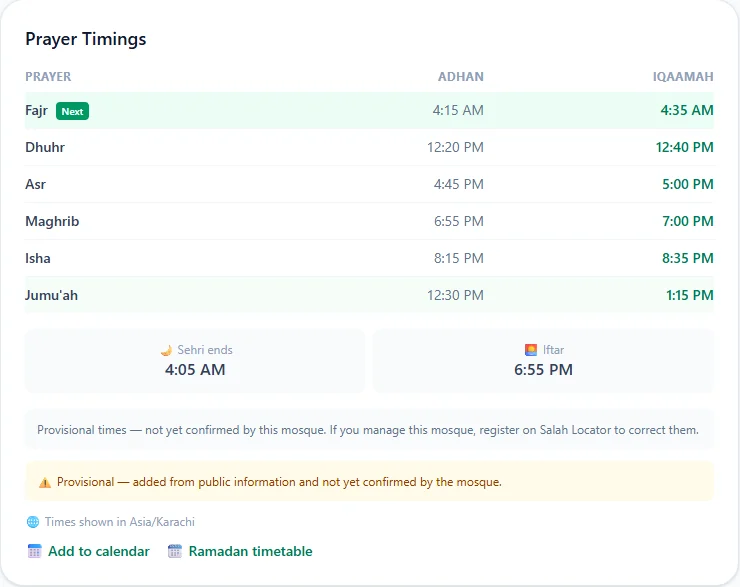
People with a reminder on your mosque have it moved to your new time when their app next checks, and get a short time updated notification.
Reported corrections
Worshippers can report a time they think is wrong. On the website, these appear at the top of Prayer Timings under Reported corrections, showing the current time, the suggested one, any note and who sent it. In the app, open Reported corrections on the management screen.
- Accept writes the new time into your timetable immediately, marked as a congregation correction.
- Dismiss removes the report and changes nothing.
Sehri and Iftar (website)
Under Fasting (Sehri & Iftar):
- Imsak buffer (minutes) sets how long before the Fajr Adhan Sehri ends. It is 10 unless you change it.
- Sehri ends (override) and Iftar (override) set exact times instead. Otherwise Iftar is your Maghrib Adhan.
Ramadan and seasonal timetables
A seasonal timetable replaces your usual one for a date range, for Ramadan or the winter months.
- Website: under Special timings, tap + Add. Give it a Label such as Ramadan 1447, choose From and To dates, enter the times that change (including Jumuʼah), and optionally Sehri and Iftar overrides and notes. Tap Save. A timetable in force shows Active now.
- App: tap Ramadan and seasonal times, then Add a timetable, and fill in Name, From, Until and the times. The one in force is marked IN FORCE.
Leave a prayer blank and your usual time still applies. While it is in force, the public page shows Special timings in effect with its name.
Eid prayers
- Website: under Eid prayers, tap + Add. Enter a Label (for example Eid al-Fitr 1447), the Date, the Jamaat times (use + Add another jamaat for more), a Location if it isn't at the mosque, and notes.
- App: tap Eid prayers → Add an Eid prayer and fill in Which Eid, Date, Jamaat times and Where (optional).
Eid entries appear on your page as the date approaches.
Tarawih
- Website: under Tarawih (Ramadan), tap + Add. Enter a Label, From and To dates, the Start time, Rak'ahs (8 or 20) and the Hafiz / Imam. Under Khatm schedule, tap ⚙ Auto-generate (~1 juzʾ/night), or type the plan for each night.
- App: tap Tarawih → Add Tarawih, fill in Name, Starts at and Rakats, and use Add a row per night for the khatm plan.
Tarawih appears on your page during Ramadan and in the weeks just before it, with tonight's juzʼ highlighted.
To publish news alongside your times, see Post announcements, events and live streams. How this looks to worshippers is covered in Jumuʼah, Ramadan, Tarawih and Eid times. New to this? Start with Add your mosque.
Frequently asked questions
How quickly do new times appear?
Straight away on the mosque's page, the website and the app. People who have a reminder on your mosque have it moved automatically the next time their app checks, and are told the time changed.
Should I re-save times that haven't changed?
Yes, every few months. Saving the timetable confirms it. After about six months without a save, visitors see a note that the times may have changed.
How do I set different times for Ramadan?
Add a special (seasonal) timetable with a name and a date range. Any time you enter replaces the usual one while it is in force; leave a prayer blank to keep the usual time.
What are reported corrections?
Worshippers can report a time they believe is wrong. Reports for your mosque wait at the top of the timings screen; accepting one updates the timetable immediately, dismissing it changes nothing.
Was this article helpful?
Related articles
- Add your mosque to Salah Locator or claim an existing listingCreate an ordinary account, then choose Register a mosque in the app or on your web dashboard. If the mosque is already listed with no administrator, claim it in the app instead of adding a duplicate.
- Post announcements, events and live streams for your mosqueIn Manage Mosque, open Announcements, Events or Live Streams, tap + New, fill in the form and save. A new announcement or event that is published straight away notifies everyone who saved your mosque.
- Find Jumuʼah, Ramadan, Tarawih and Eid prayer timesJumuʼah has its own row in each mosque's timetable. In Ramadan a mosque can switch to a seasonal timetable and publish Sehri, Iftar, Tarawih and Eid times, which appear as the dates approach.
- Find the nearest mosque and change the search radiusOn the website, tap Use my location and choose 5, 10, 15 or 25 km; results are sorted by distance and can be shown on a map. In the app, Find lists mosques within 15 km of you.
Need a hand?
Email us what you see on screen — a screenshot helps — and we'll walk you through it.