Find the Qibla with the Salah Locator compass and calibrate it
In short
Open the Qibla finder from the compass icon on Find or from Profile, allow location, and turn until the arrow reaches the top marker. If it asks, calibrate by moving the phone in a figure-8.
On this page
To find the Qibla, open Salah Locator's Qibla finder, allow location, hold the phone flat or upright in front of you, and turn until the arrow reaches the marker at the top of the dial. When you are within a few degrees, the heading changes to You're facing the Qibla 🕋. If the app warns that the compass needs calibrating, move the phone in a figure-8 a few times and try again away from metal.
Open the Qibla finder
There are two ways in:
- On the Find tab, tap the compass icon at the top right.
- Or open Profile and tap Qibla finder.
The first time, the screen says Find the Qibla. Tap Use my location and allow location access; the app needs your position to work out the direction of Makkah.
Face the Qibla
- Hold the phone flat, or upright in front of you. Both work.
- Read Turn until the arrow reaches the top marker at the top of the screen.
- Turn your whole body slowly until the arrow points at the small marker at the top of the dial. The Kaaba symbol on the edge of the dial shows where Makkah lies as you turn.
- When you are lined up, the text changes to You're facing the Qibla 🕋 and the arrow changes colour.
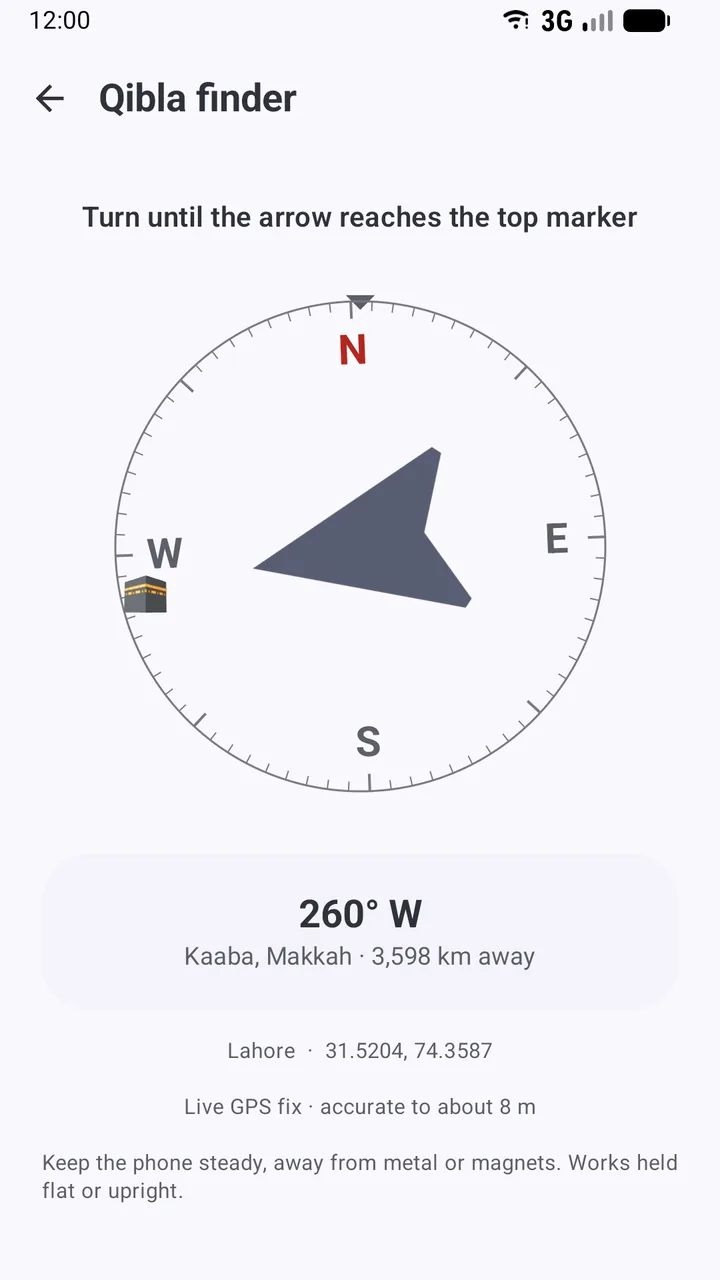
Below the dial, the app shows:
- The bearing, such as 260° W: the direction of the Kaaba in degrees clockwise from true north.
- Kaaba, Makkah · 3,598 km away: the distance from where you stand.
- Your place and coordinates.
- How good your location fix is, for example Live GPS fix · accurate to about 8 m, or Using your last known position if the phone couldn't get a fresh fix.
A phone's compass points to magnetic north, which can be several degrees away from true north. Salah Locator corrects for this difference (the magnetic declination) at your location, so the arrow follows true north.
Calibrate the compass
If you see ⚠ Compass needs calibrating — wave the phone in a figure-8 a few times.:
- Hold the phone firmly and move it slowly through a figure-8 in the air, as if drawing a sideways 8.
- Turn your wrist as you go so the phone points in different directions.
- Repeat three or four times until the warning disappears.
Get a steadier reading
The app's own tip is Keep the phone steady, away from metal or magnets. In practice:
- Step away from steel desks, radiators, cars, fridges and large speakers.
- Take the phone out of any case or car mount with a magnet, and away from laptops.
- Indoors, reinforced concrete can pull a compass off. Near a window or outside is often better.
- If the arrow jumps around, calibrate again and let it settle for a few seconds.
No compass sensor?
Some phones don't have one. The app then shows ⚠ This device has no compass sensor, so the arrow cannot track which way you are facing. The bearing above is still correct — line it up using another compass. Use the degrees shown with a separate compass, or a landmark whose direction you know.
Qibla direction on mosque pages
Every mosque page on sl.abdohoo.app with a map location has a Qibla Direction card. It gives the bearing from that mosque, for example 260° with W from true north, and Direction to the Kaaba, Makkah.
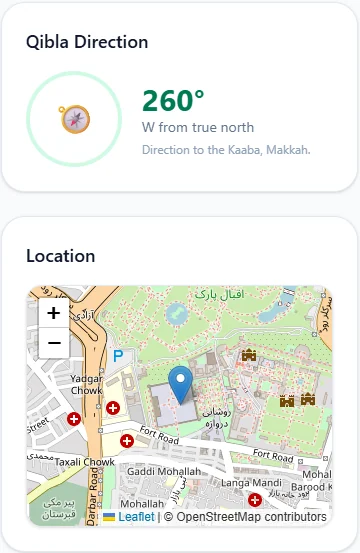
If you use this bearing with an ordinary magnetic compass, remember the compass shows magnetic north. Adjust for your local declination, or use the app, which does it for you.
The Qibla finder works without mobile data; see what works offline. For why compasses drift and other ways to check the direction, read How to find the Qibla direction with your phone.
Frequently asked questions
How accurate is the Qibla finder?
The bearing itself is calculated precisely from your coordinates to the Kaaba, and corrected from magnetic north to true north. What limits accuracy is your phone's compass sensor, which is thrown off by metal and magnets, so calibrate it and hold the phone away from them.
How do I calibrate the compass?
When the app shows Compass needs calibrating, move the phone slowly in a figure-8 in the air a few times, turning your wrist as you go, until the warning disappears.
Does the Qibla finder work without internet?
Yes. It needs your phone's GPS and compass, not mobile data. If there's no fresh GPS fix, it uses your last known position and says so.
My phone has no compass. Can I still find the Qibla?
Yes. The app shows a message that the arrow can't follow you, but the bearing in degrees is still correct. Line it up with another compass or a landmark whose direction you know.
Was this article helpful?
Related articles
- Add a mosque's prayer times or events to your calendarOn a mosque's web page, tap Add to calendar under Prayer Timings to download its daily Iqaamah times as a calendar file, or Add to calendar under an event. Download again when times change.
- Install Salah Locator and set it up on your Android phoneInstall Salah Locator free from Google Play (Android 8.0 or later), then tap the location button on Find and allow location. Mosques, timetables and Pray Now work without an account.
- Set up prayer reminders and fix alarms that don't ringOpen a mosque, tap Alarms, choose Adhan or Iqaamah and switch on the prayers you want. If reminders are late or silent, allow exact alarms and notifications and lift battery limits.
- Use Salah Locator offline: what works without a connectionMosque pages you've opened stay on your phone for up to 30 days, alarms are scheduled on the device and the Qibla finder works from GPS. Pray Now and new searches need a connection.
Need a hand?
Email us what you see on screen — a screenshot helps — and we'll walk you through it.