Salah Locator · Help
Salah Locator help centre
Prayer times and nearby mosques, free and ad-free.
Getting started
Install the app, allow location and find your mosque.
Prayer times & reminders
Adhan and Iqaamah times, reminders, the widget and offline times.
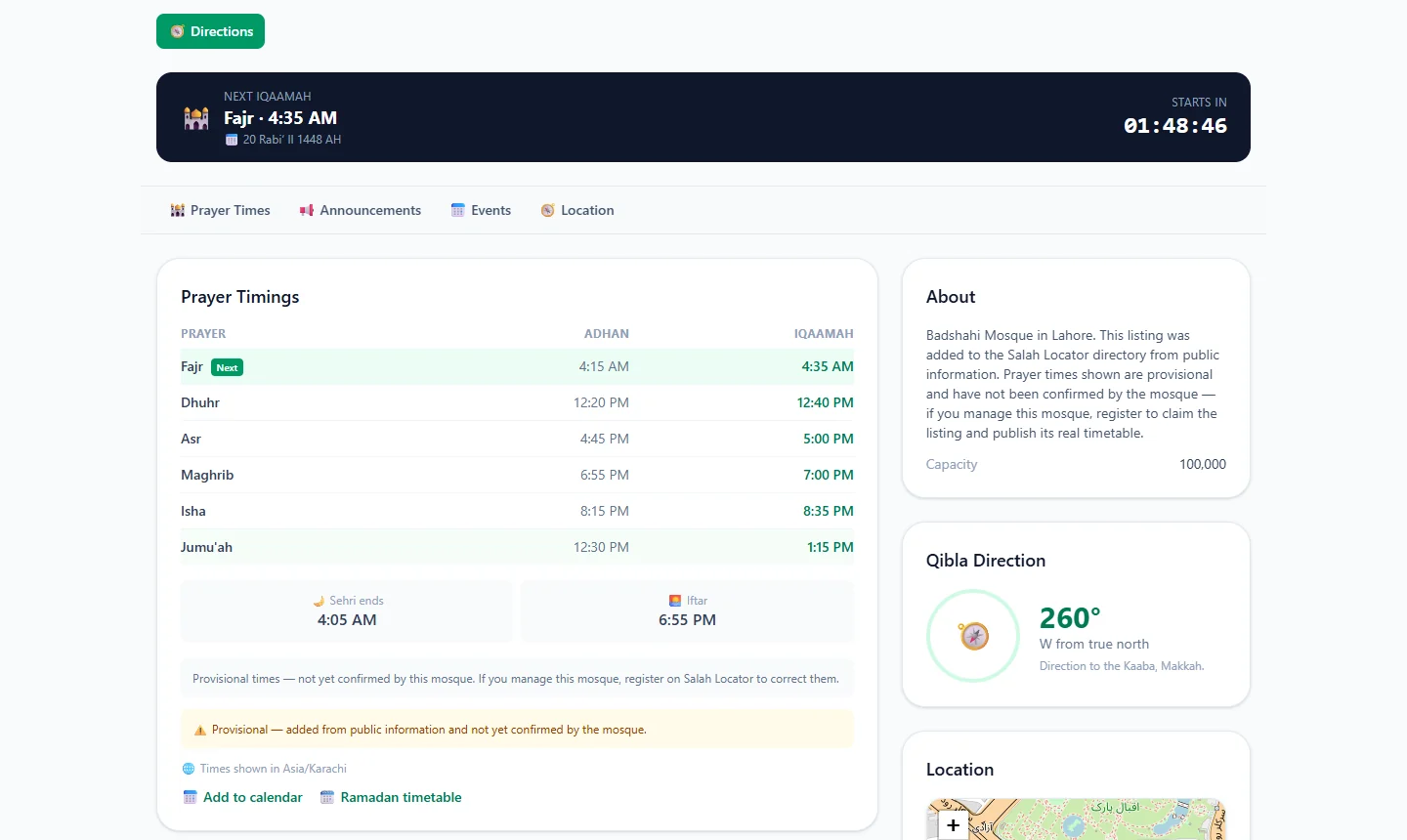
- Read a mosque's timetable: Adhan, Iqaamah and estimated timesAdhan is the call to prayer; Iqaamah is when the congregation stands. A note under each timetable says whether the times come from the mosque, a correction or a calculation.
- Set up prayer reminders and fix alarms that don't ringOpen a mosque, tap Alarms, choose Adhan or Iqaamah and switch on the prayers you want. If reminders are late or silent, allow exact alarms and notifications and lift battery limits.
- Add the Salah Locator prayer times widget to your home screenLong-press your home screen, open Widgets, drag out Salah Locator's Prayer times widget, pick a mosque and a theme, and tap Add widget. It shows the next prayer and today's five times.
- Use Salah Locator offline: what works without a connectionMosque pages you've opened stay on your phone for up to 30 days, alarms are scheduled on the device and the Qibla finder works from GPS. Pray Now and new searches need a connection.
- Find Jumuʼah, Ramadan, Tarawih and Eid prayer timesJumuʼah has its own row in each mosque's timetable. In Ramadan a mosque can switch to a seasonal timetable and publish Sehri, Iftar, Tarawih and Eid times, which appear as the dates approach.
Finding mosques
Nearby mosques, Pray Now, search, favourites and mosque pages.
- Find the nearest mosque and change the search radiusOn the website, tap Use my location and choose 5, 10, 15 or 25 km; results are sorted by distance and can be shown on a map. In the app, Find lists mosques within 15 km of you.
- Use Pray Now to catch a congregation near youPray Now picks the current prayer and lists nearby mosques whose Iqaamah is still ahead, soonest first, highlighting the earliest one and the one that gives you most time to get there.
- Save your favourite mosques and follow their updatesSign in, then tap the bookmark on a mosque in the app or the star on the website. Saved mosques appear under Saved on both, and you are notified of their new announcements and events.
- See a mosque's announcements, events and live streamsOpen the mosque's page: live streams, announcements (pinned first) and upcoming events sit below the timetable. Save the mosque to be notified when it posts something new.
Qibla & tools
The Qibla compass and other tools in the app.
- Find the Qibla with the Salah Locator compass and calibrate itOpen the Qibla finder from the compass icon on Find or from Profile, allow location, and turn until the arrow reaches the top marker. If it asks, calibrate by moving the phone in a figure-8.
- Add a mosque's prayer times or events to your calendarOn a mosque's web page, tap Add to calendar under Prayer Timings to download its daily Iqaamah times as a calendar file, or Add to calendar under an event. Download again when times change.
For imams & mosque admins
Put your mosque online and keep its timings, announcements and events current.
- Add your mosque to Salah Locator or claim an existing listingCreate an ordinary account, then choose Register a mosque in the app or on your web dashboard. If the mosque is already listed with no administrator, claim it in the app instead of adding a duplicate.
- Update your mosque's prayer timings, Ramadan and Eid timesOpen Manage Mosque → Prayer Timings on the website, or My mosques → your mosque → Prayer timings in the app, enter Adhan and Iqaamah for each prayer and Jumuʼah, and save. Changes show at once.
- Post announcements, events and live streams for your mosqueIn Manage Mosque, open Announcements, Events or Live Streams, tap + New, fill in the form and save. A new announcement or event that is published straight away notifies everyone who saved your mosque.
Account, data & privacy
Your account, what is stored and how to delete it.
Salah Locator on the blog
More →
Why offline prayer times matter, and what really works without signal
Prayer times come from the sun and a mosque's timetable, and neither needs a live connection once it's on your phone. A well-built app keeps times, alarms and the Qibla working when the signal drops.
Why Jumuʼah times differ from one mosque to the next
Jumuʼah is prayed in the time of Dhuhr, but each mosque sets its own Adhan, khutbah and Iqamah. Clock changes, khutbah length, space and local working hours explain most of the difference.

Salah Locator 1.2: add your mosque and see where times come from
Salah Locator 1.2 lets anyone add the mosque they attend, lets worshippers report a wrong prayer time for the mosque to confirm, and labels every timetable with where its times came from.
Can't find what you need?
Tell us what you were trying to do in Salah Locator and we'll help — and add the answer here.