Test your hifz with hidden text, and the experimental vowel check
In short
Turn on Hide the text while I recite in Practice, or the hifz test on Listen: words appear only once you recite them. After a practice attempt, Check my vowels flags harakat that may differ.
On this page
Samee can test your memorisation by hiding the text until you recite it. In Practice, keep Hide the text while I recite switched on and tap Start reciting: each word appears only when you say it, missed and wrong words are marked, and a hint appears if you get stuck. For longer passages, switch on Hifz test: hide the text until it is recited on Listen. After a practice attempt you can also run Check my vowels, an experimental check of the harakat.
Hifz test in Practice (up to 10 ayahs)
- Open Practice and choose an ayah from Your weak ayahs or under Any ayah (up to 10 ayahs).
- Listen to the reciter first if you like (how).
- Under 2. Recite, leave Hide the text while I recite switched on.
- Tap Start reciting and recite from memory.
The ayahs are replaced by dashed lines. Each word appears as you recite it, in its colour: correct, wrong, missed or sounded different. If you stop for about 4 seconds, A hint: the next words shows the next few words. Samee stops when you reach the end, or tap I'm done.
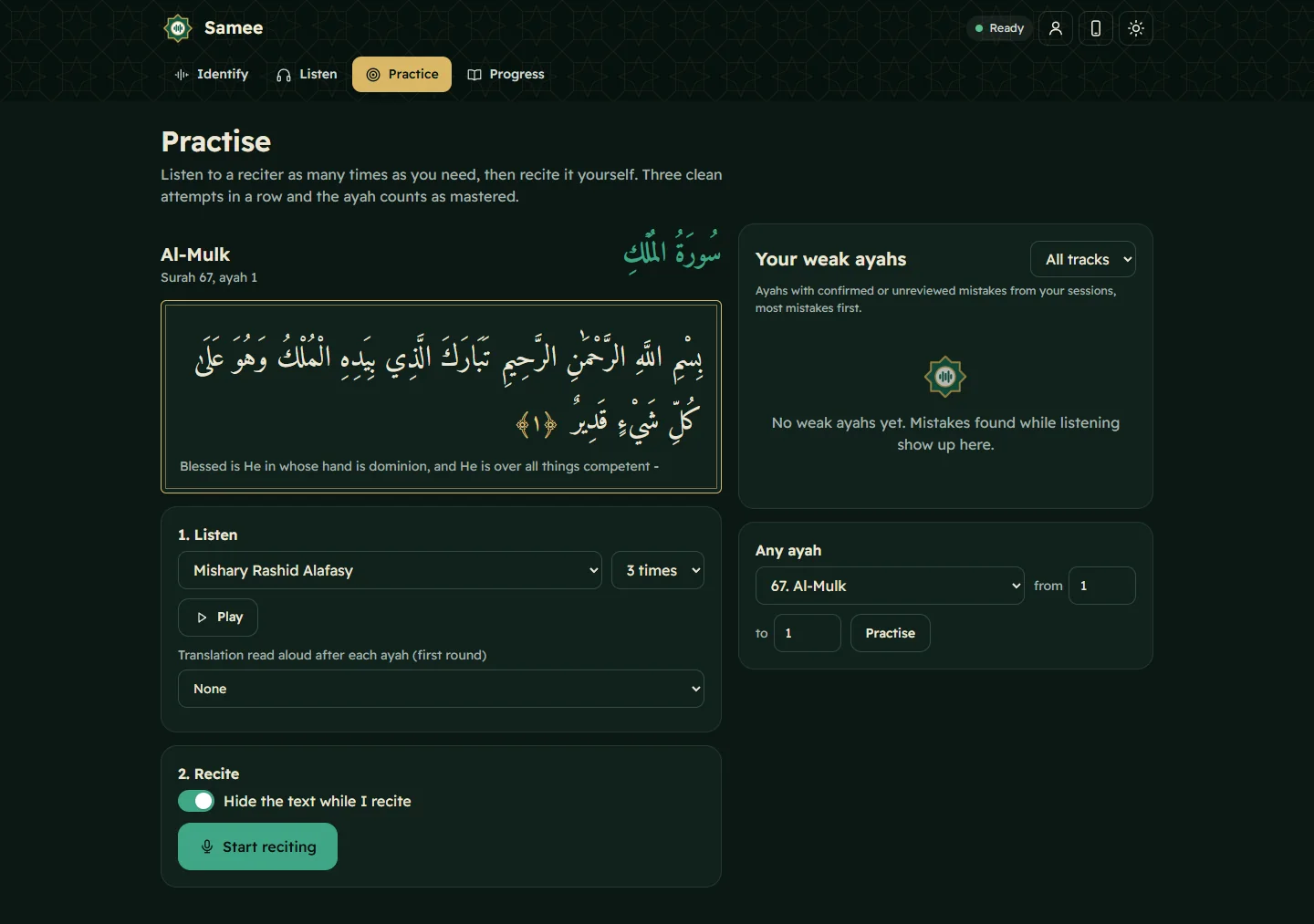
You get Clean recitation, the number of mistakes, or Not finished, as with any attempt. Three clean attempts in a row mark the ayah Mastered.
Hifz test on Listen (any length)
For a page, a juz or a student's whole lesson:
- Open Listen.
- Under Where does it start?, choose Start at a chosen ayah and set the surah and ayah. (Or continue a track.)
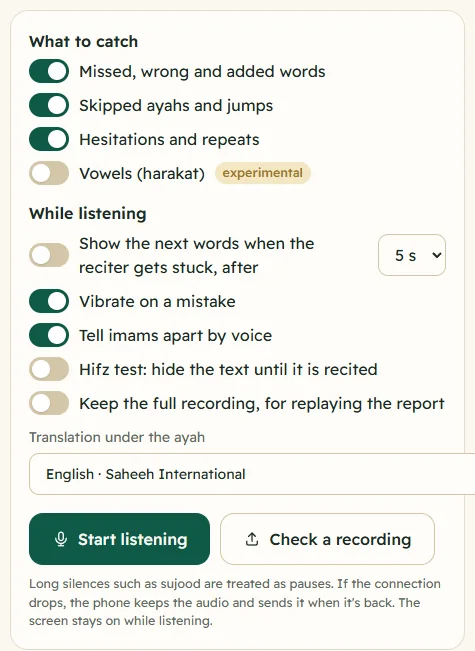
- Under While listening, switch on Hifz test: hide the text until it is recited. If you have never set prompting, Show the next words when the reciter gets stuck switches on with it; choose 3, 5 or 8 seconds.
- Tap Start listening and recite.
During the session:
- the text is hidden behind dashed lines and fills in as you recite;
- the translation is hidden too;
- Show text shows the upcoming words faintly, for a quick peek, and Hide text hides them again;
- at the end of an ayah, Samee waits twice the prompt time before showing Next ayah.
The session is saved with a full report, like any other. For a teacher, give each student their own track so their tests add up (tracks).
The experimental vowel check
Samee mainly checks words. The vowel check goes one step further and looks at the short vowels (fatha, kasra, damma), tanween, sukun and shadda.
After a practice attempt
- Finish an attempt on Practice.
- Under the result, tap Check my vowels (marked experimental).
- Wait while it says Listening closely, this takes a little while.
You then see one of:
- Vowels as written, with how many harakat were checked;
- a list of words that may have a different vowel, each saying, for example, On “ق”: written damma, sounded like fatha. Listen to the reciter on those words, then decide;
- a note that the recording didn't line up well with these ayahs, so the check isn't reliable. Recite exactly the chosen ayahs and try again.
During a Listen session
Switch on Vowels (harakat) under What to catch. Possible vowel differences then appear as Vowel may differ notes, with a gold line under the word. They are minor notes and never count as mistakes.
Read it with care
In the developer's tests on clean recitations by three well-known reciters, the check flagged none of the correct vowels, and it caught single vowels that had been changed on purpose. Real recordings are harder: noise, echo, a fast pace or a soft voice can all produce false flags. The vowel check:
- is a prompt to listen again, not a ruling on your recitation;
- doesn't check makharij (articulation), madd lengths, ghunnah or other tajwid rules;
- works best on a clear, close recording of the exact ayahs.
Vowel mistakes that change a word's meaning are serious, and the way to be sure is to recite to a qualified teacher. Read more in lahn jali and lahn khafi.
Frequently asked questions
How do I test my memorisation of a whole juz?
On Listen, switch on Hifz test: hide the text until it is recited, choose Start at a chosen ayah, and recite. The text appears word by word as you recite it, and every missed or wrong word is marked.
Can I peek at the hidden text?
Yes. During a Listen session with the hifz test, tap Show text to see the upcoming words faintly, and Hide text to hide them again.
How accurate is the vowel check?
It is experimental. In the developer's tests on clean recitations it rarely flagged correct vowels and caught single changed vowels, but real recordings vary. Treat each flag as a prompt to listen to the reciter, not as a verdict.
Why is the vowel check slow?
It runs a separate, larger speech model that lines up each sound with the written vowels. It takes a little while, and checks one recording at a time.
Was this article helpful?
Related articles
- Practise your weak ayahs: listen on repeat, then recitePractice lists the ayahs with the most mistakes from your sessions. Pick one, play a reciter up to seven times, then tap Start reciting. Three clean attempts in a row and the ayah counts as mastered.
- What Samee is and how to start using it in your browserSamee listens to Quran recitation. It names the surah, ayah and reciter, follows a reciter word by word to mark mistakes, and helps you practise. Open samee.abdohoo.app; no sign-up needed.
- What each marked mistake means: missed, wrong, skipped and moreSamee sorts what it hears into mistakes (missed, wrong or added words, skipped ayahs, jumps), minor notes (sounded different, repeated, hesitated, vowel) and information such as pauses.
- Show the next words when a reciter gets stuck (talqeen)Turn on Show the next words when the reciter gets stuck and pick 3, 5 or 8 seconds. When the reciter goes quiet mid-ayah, Samee shows the next few words on screen so you can prompt them.
Need a hand?
Email us what you see on screen — a screenshot helps — and we'll walk you through it.