Show a Quran translation under each ayah, in your language
In short
On Listen, pick a translator from Translation under the ayah, or Arabic only. The choice applies to Identify, Listen and Practice in that browser. Practice can also read a translation aloud.
On this page
Samee shows the Quran in Arabic, and can add a translation under each ayah in your language. Open Listen, choose a translator from Translation under the ayah, or Arabic only to show none. The choice is saved in your browser and used everywhere Samee shows ayahs: identify results, the live view and Practice. Samee's own buttons and messages are in English.
Choose a translation
- Open the Listen tab.
- Find Translation under the ayah, below the listening options.
- Open the menu. Translations are grouped by language, English first, then the other languages in alphabetical order. Each entry shows the language and the translator, for example Urdu · Fateh Muhammad Jalandhry.
- Pick one, or Arabic only at the top of the list.
You don't need to start a session: the choice is saved as soon as you make it. The first time, Samee uses English (Saheeh International).
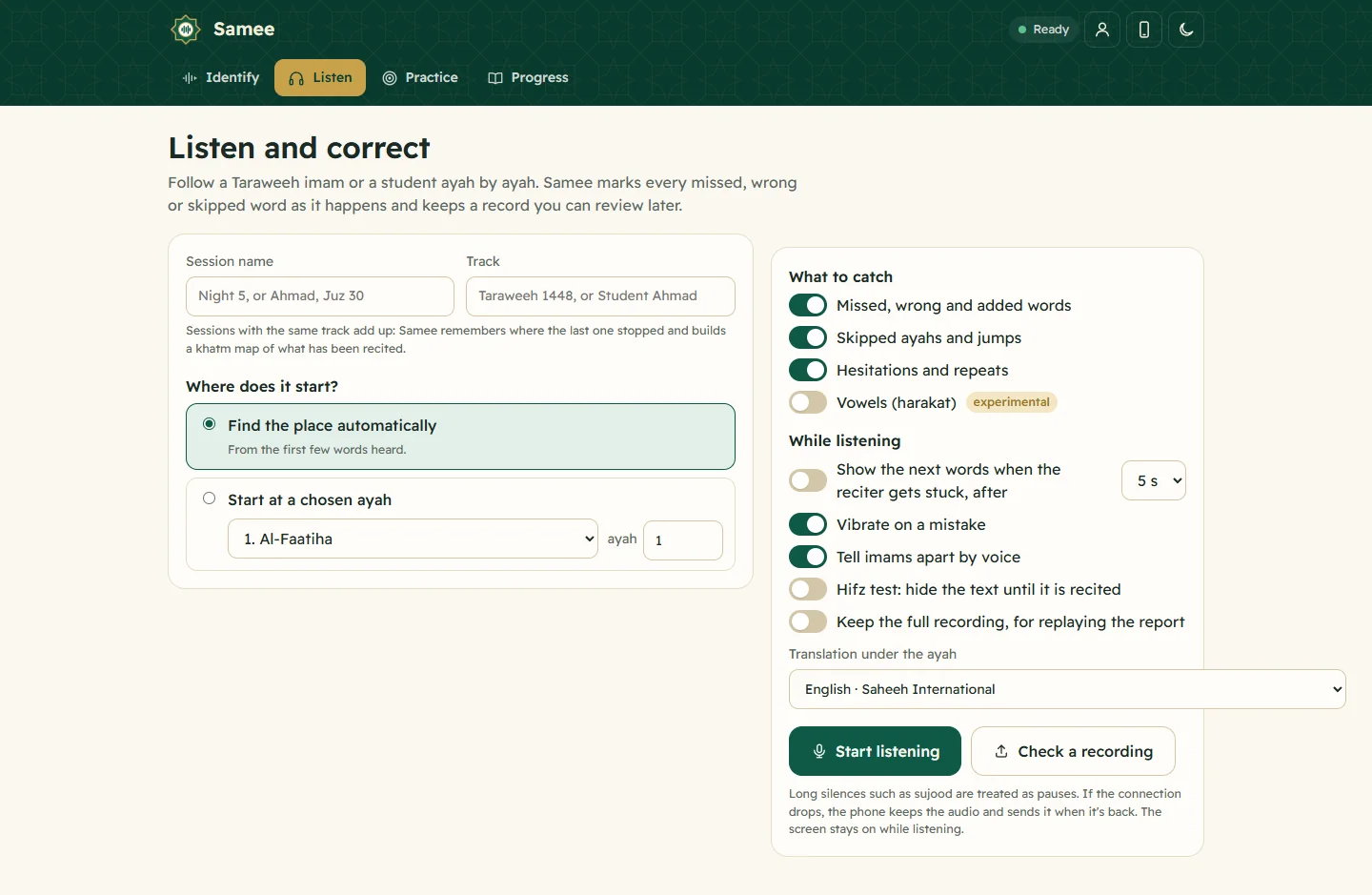
Where the translation appears
- Identify. Under each ayah of the result.
- Listen. Under the ayah being recited, in the ayah view.
- Practice. Under each ayah you practise, while you listen. It is hidden while you recite, and comes back with the result.
During a hifz test (the text hidden until it is recited), the translation is hidden too.
Languages available
As of October 2026 Samee offers more than 60 translations in 32 languages. Several languages have more than one translator; English and Urdu have several each.
| Albanian | Amharic | Bengali | Chinese |
| Czech | Dutch | English | French |
| German | Hausa | Hindi | Indonesian |
| Italian | Japanese | Korean | Malayalam |
| Norwegian | Pashto | Persian | Polish |
| Portuguese | Romanian | Russian | Sindhi |
| Spanish | Tamil | Tatar | Thai |
| Turkish | Urdu | Uyghur | Uzbek |
Under English you will also find English Transliteration, which writes the Arabic in Latin letters. It helps when you are learning to read, but it can't show every sound of the Arabic accurately, so use it alongside the Arabic text and a teacher.
Translations in right-to-left languages, such as Urdu, Persian, Pashto, Sindhi and Uyghur, are shown right to left.
The list may change as translations are added. Translations come from the Tanzil project and similar sources, and each one keeps its translator's name. A translation conveys a meaning of the Quran; it is not the Quran itself.
Hear a translation read aloud in Practice
Practice can play a recorded translation after each ayah, on the first round of listening.
- Open Practice and choose an ayah (from your list, or under Any ayah).
- Under 1. Listen, open Translation read aloud after each ayah (first round).
- Choose a reader, or None.
- Tap Play. The reciter recites each ayah, followed by the translation, then repeats the Arabic for the remaining rounds.
Readers are currently available in English, Urdu, Persian, Bosnian and Azerbaijani.
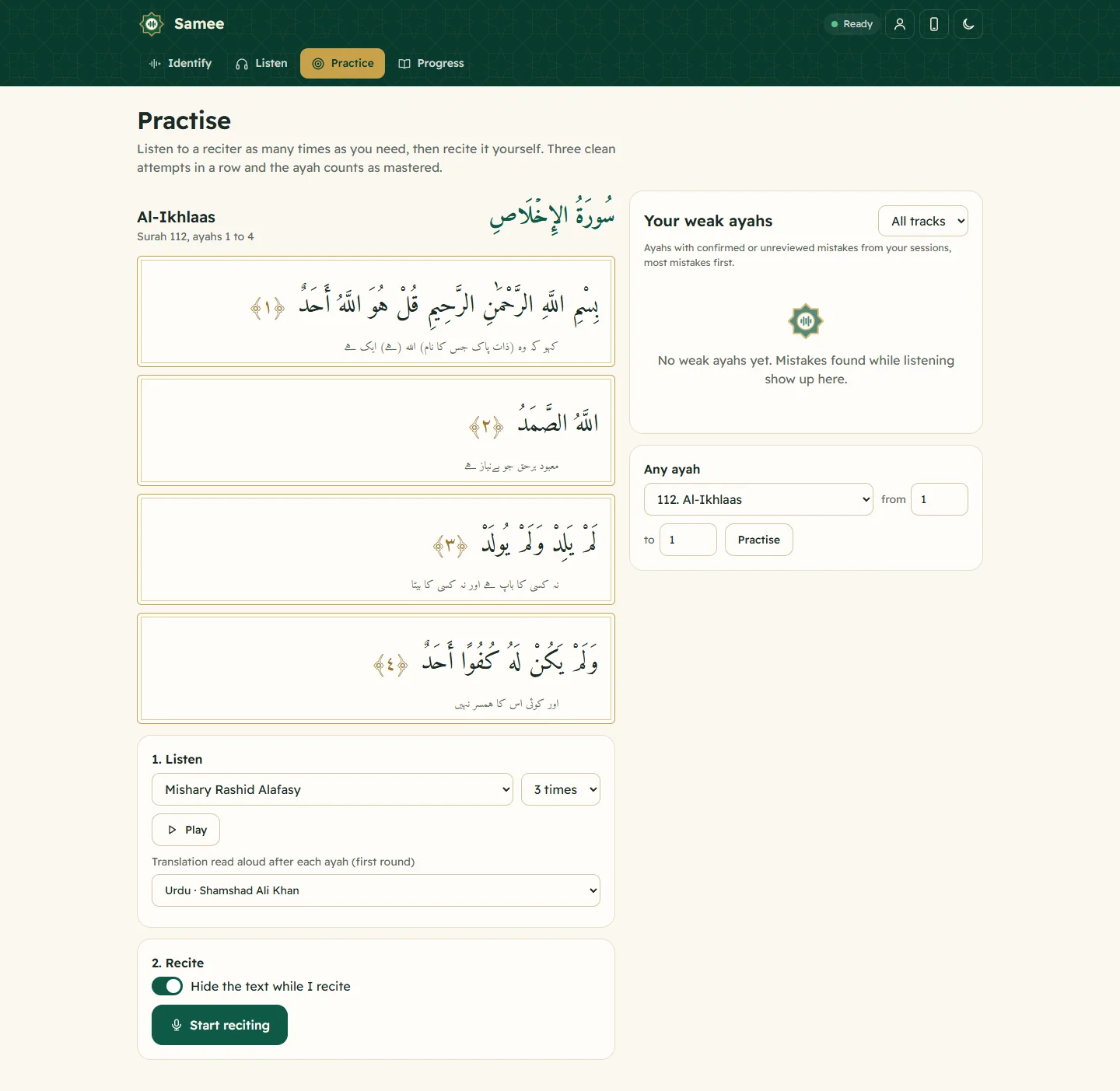
Good to know
- The setting belongs to the browser. A second phone, or an installed app on an iPhone, starts with English until you choose again.
- If you see the basmalah at the start of an ayah 1 in Practice, that is how the source text stores it; the basmalah is not counted as a missed word when you leave it out while reciting.
- Translations don't affect what Samee listens for. It always follows the Arabic.
See also: practise your weak ayahs and read the identify result.
Frequently asked questions
Can I use Samee in Urdu or another language?
Samee's buttons and messages are in English. The Quran text is always shown in Arabic, and you can show a translation under each ayah in 32 languages, including Urdu, Indonesian, Turkish, Bengali, French and Hindi.
Where do I change the translation?
Open Listen and use the Translation under the ayah menu. Pick Arabic only to hide translations. The choice is kept in your browser and used on Identify, Listen and Practice.
Is there a transliteration?
Yes. Under English, choose English Transliteration to show the ayah in Latin letters.
Why is the translation hidden during a hifz test?
When the text is hidden to test your memory, the translation is hidden too, so it doesn't give the words away.
Was this article helpful?
Related articles
- What Samee is and how to start using it in your browserSamee listens to Quran recitation. It names the surah, ayah and reciter, follows a reciter word by word to mark mistakes, and helps you practise. Open samee.abdohoo.app; no sign-up needed.
- Allow the microphone for Samee, and why it needs HTTPSTap the star or Start listening, then choose Allow when the browser asks for the microphone. If you blocked it, re-allow it in the site settings. Browsers only share the microphone over HTTPS.
- Install Samee on your phone or computer like an appOpen samee.abdohoo.app, then use your browser's Install app or Add to Home Screen option. Samee then opens full screen from its own icon, with shortcuts to Listen, Practise and Progress.
- Switch Shadecard to Urdu (اردو) and back to EnglishTap اردو in the English | اردو switch at the top of the home screen. The whole app turns to Urdu, right to left, including warnings and dyeing terms. Tap English to switch back.
Need a hand?
Email us what you see on screen — a screenshot helps — and we'll walk you through it.