Show the next words when a reciter gets stuck (talqeen)
In short
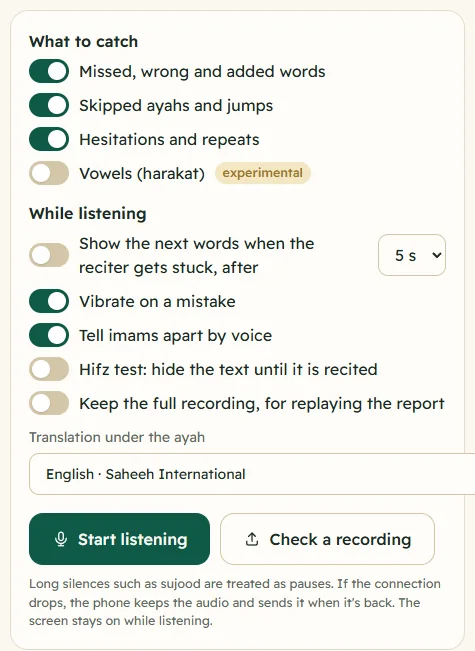
Turn on Show the next words when the reciter gets stuck and pick 3, 5 or 8 seconds. When the reciter goes quiet mid-ayah, Samee shows the next few words on screen so you can prompt them.
On this page
Talqeen, or prompting, means giving a reciter the next words when they get stuck. In Samee, turn on Show the next words when the reciter gets stuck, after in the Listen setup and choose 3 s, 5 s or 8 s. When the reciter stops in the middle of an ayah for that long, a card at the top of the text shows the next few words, so you can prompt them, or a student can glance at them.
Turn prompting on
- Open Listen.
- Under While listening, switch on Show the next words when the reciter gets stuck, after.
- Choose how long to wait: 3 s, 5 s (the default) or 8 s. Choosing a time switches prompting on as well.
- Set up the rest of the session and tap Start listening.
Samee remembers the setting in this browser for your next sessions.
What you see
When the reciter goes quiet, a card appears above the ayah text:
- Next words · 2:255 when they stopped in the middle of an ayah;
- Next ayah · 2:256 when they stopped at the end of one (in a hifz test only).
Below the label are the next few words in Arabic, usually three or four. The phone vibrates three short times where vibration is allowed. When the reciter carries on, the card disappears; if they stop again somewhere else, a new card appears.
The card is visual only. Samee never says anything aloud, so nothing interrupts the prayer or the lesson.
How Samee decides when to prompt
Samee waits until it has placed the words recited before the silence, so it doesn't prompt with words that were just said. Then:
- In the middle of an ayah, it prompts after the silence you chose.
- At the end of an ayah, a pause is natural. In ordinary listening Samee doesn't prompt there at all, because a silence between ayahs is usually a breath, ruku or sujood.
- In a hifz test and in Practice, it also prompts at the end of an ayah, after twice the time you chose, because there a long silence usually means the student is stuck.
If you pause the session yourself, the card is hidden.
Talqeen in a hifz test
When you switch on Hifz test: hide the text until it is recited, the words appear only as they are recited, and a prompt is the one way to see what comes next. If you have never changed the prompting setting, Samee switches it on with the hifz test.
On the Practice tab, reciting with Hide the text while I recite gives a hint after about 4 seconds of silence, labelled A hint: the next words. Each hint you needed is a sign the passage needs more revision. See hifz test and vowel check.
Using it in Taraweeh
If you are following an imam to help him when he gets stuck, Samee shows you where he is and what comes next, so your prompt is right the first time. Keep in mind:
- Correcting the imam is a responsibility of those praying behind him, and the schools of fiqh have their own details on when and how to do it. Follow your mosque's practice and ask a scholar if unsure.
- Don't operate a phone while you pray. Samee's card is for someone listening who isn't in the prayer, or for reviewing afterwards.
- Choose 5 s or 8 s for Taraweeh, so a breath or a slow, measured recitation doesn't trigger a card.
The blog post what is talqeen covers the practice in more detail.
Tips
- For a nervous student, 8 s gives them time to remember before the answer appears.
- For revision of a passage you know well, 3 s keeps you moving.
- With Hesitations and repeats on, each stop of about 3 seconds or more in the middle of an ayah is also recorded as a Hesitated note in the report, so you can see where prompts were needed. See what each finding means.
Frequently asked questions
Does Samee say the next words out loud?
No. The next words appear on your screen, and the phone vibrates three times where vibration is allowed. It's for you to prompt the reciter, or for a student reciting to the phone to glance at.
How long does Samee wait before prompting?
In the middle of an ayah it waits the time you chose: 3, 5 or 8 seconds of silence. Between ayahs it prompts only in a hifz test or in Practice, and waits twice as long there, because a pause between ayahs is normal.
Will it prompt during ruku or sujood in Taraweeh?
No. In ordinary listening, Samee doesn't prompt across a long pause between ayahs, such as ruku or sujood. It prompts when the imam stops in the middle of an ayah.
Is prompting on by default?
No. Turn it on in the Listen setup. If you switch on the hifz test and have never set prompting before, Samee turns prompting on for you. In Practice, the hint is part of the hifz test.
Was this article helpful?
Related articles
- Follow a Taraweeh imam or a student live, word by wordOn Listen, name the session and its track, choose where it starts and tap Start listening. Samee finds the place, follows each word and lists missed, wrong and skipped words as they happen.
- Taraweeh in Samee: rak'ahs, sajdah, qunoot and imams taking turnsSamee expects Taraweeh: a silent basmalah isn't a missed word, each rak'ah's Al-Fatiha is recognised, the sajdah and qunoot are labelled, and imams are told apart by voice.
- What each marked mistake means: missed, wrong, skipped and moreSamee sorts what it hears into mistakes (missed, wrong or added words, skipped ayahs, jumps), minor notes (sounded different, repeated, hesitated, vowel) and information such as pauses.
- What Samee is and how to start using it in your browserSamee listens to Quran recitation. It names the surah, ayah and reciter, follows a reciter word by word to mark mistakes, and helps you practise. Open samee.abdohoo.app; no sign-up needed.
Need a hand?
Email us what you see on screen — a screenshot helps — and we'll walk you through it.