Read your result: L*a*b*, shot spread, ΔE00 match and depth
In short
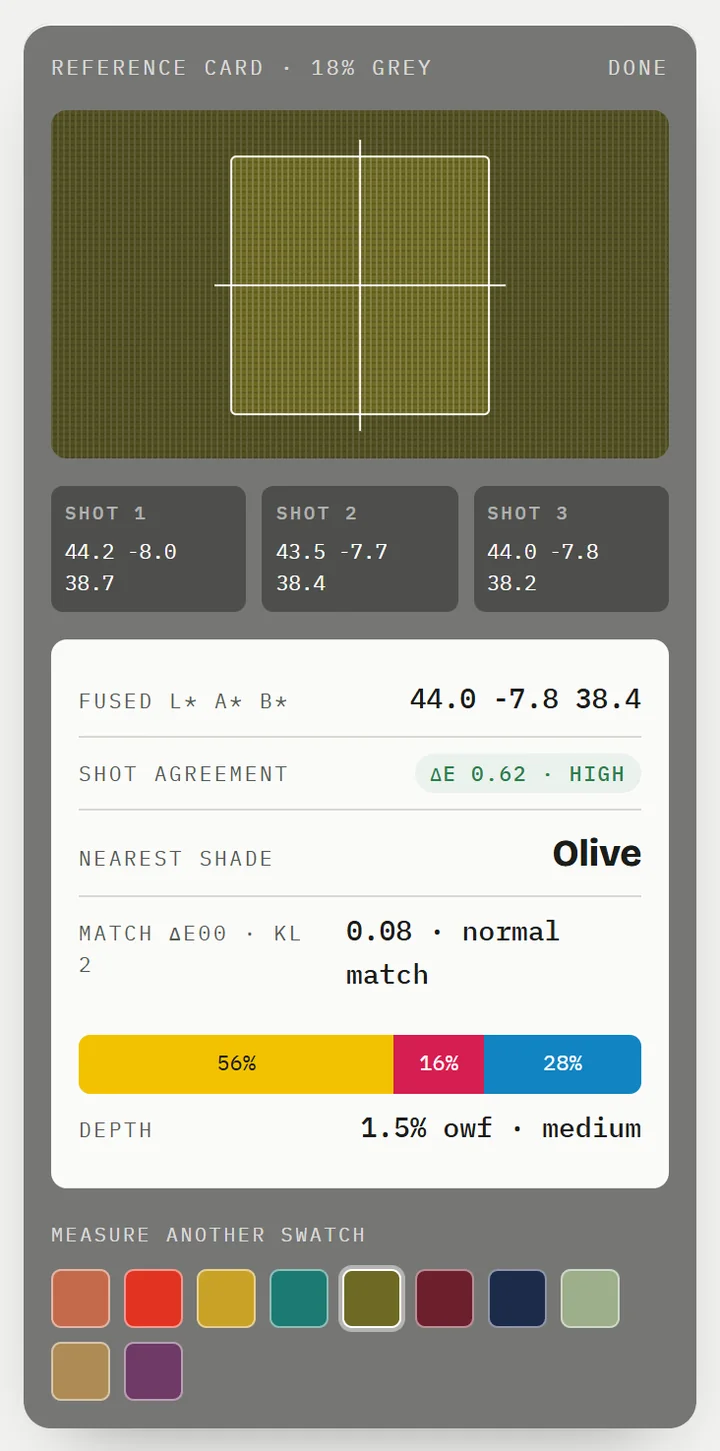
The result shows your fabric's L*a*b*, how well the three photos agreed (spread), how close the nearest shade is (ΔE00), a Y:R:B starting recipe and a depth in % owf.
On this page
A Shadecard result tells you three things: what colour the fabric measured (L*a*b*), how trustworthy that reading is (the spread between the three photos), and how close the nearest library shade is (ΔE00). Below that sit the Starting recipe – a yellow:red:blue ratio – and a depth in % owf, grams of dye per 100 g of fabric.
The numbers at a glance
The demo on sc.abdohoo.app lays out the same quantities the app reports, so it is a good way to learn them:
| Quantity | What it means |
|---|---|
| L* | Lightness, from 0 (black) to 100 (white) |
| a* | Green (−) to red (+) |
| b* | Blue (−) to yellow (+) |
| Spread / shot agreement | The largest ΔE2000 between any two of the three photos – the reading's error bar |
| Match ΔE00 | Distance from your fabric to the matched shade, using ΔE2000 with 2:1 lightness weighting |
| Depth | Suggested total dye as % of fabric weight, estimated from your L* |
Top of the result: the match
The result opens with your fabric beside the matched shade, joined by a ≈ sign, then the shade's name and a verdict:
| Match ΔE00 | Verdict shown |
|---|---|
| under 1 | Excellent match — practically the same color. |
| 1 to 2.5 | Close match. |
| 2.5 to 6 | Decent match — a little tuning will likely be needed. |
| 6 to 9 | Rough match — treat it as a starting neighbourhood. plus a ROUGH MATCH card |
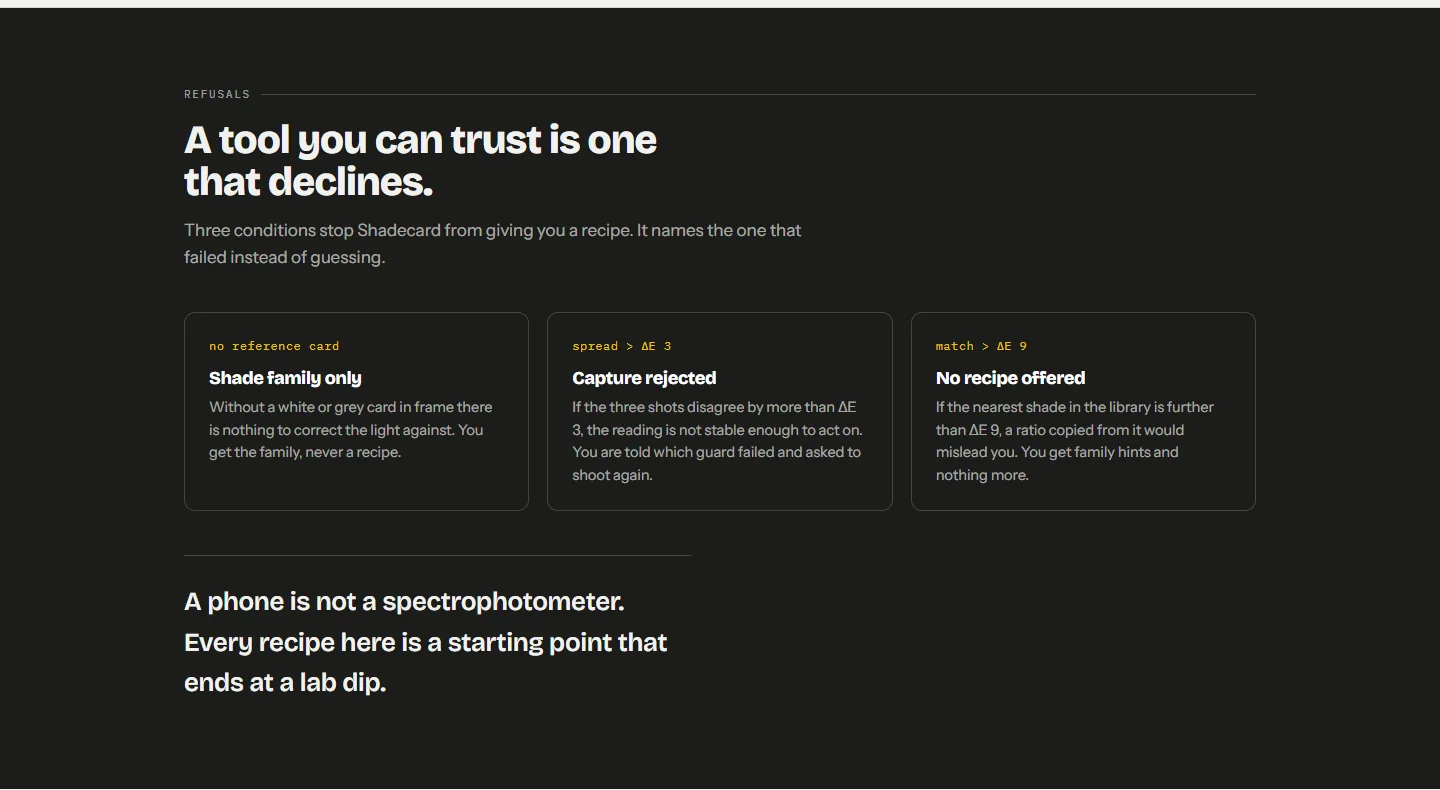
| over 9 | No shade is named – see Why Shadecard shows no recipe |
The MATCH CLOSENESS meter shows the same number on a bar with three zones: close, rough and far.
Why "2:1 lightness weighting"?
Matching uses ΔE2000 but counts a lightness difference at half weight (the textile 2:1 convention). Depth is your dial: the same Rust ratio makes a pale or a deep rust depending on how much dye you use. So the library is searched mainly for hue and chroma, and the depth is worked out separately from your fabric's own L*.
Capture quality and confidence
Under the verdict you will see Capture quality: good — the three photos agree. or Capture quality: fair. Confidence is high only when all of these hold:
- the spread is under 1,
- a reference (paper, grey card or chart) was in the frame,
- the camera held its exposure and white-balance lock, and
- the photos came from a normal still capture.
Anything the app noticed – shine, shadow, uneven area, blur, flicker – is listed in a HEADS-UP card. These warnings never block the result, but they explain a fair rating.
The Starting recipe
The recipe card shows the ratio (for example Y 56 · R 16 · B 28) with a coloured bar, and a line such as Use about 1.5% of the fabric's weight in dye — a "medium" depth for how dark your fabric reads.
Depth bands come from your measured L*:
| Your L* | Band | Typical % owf |
|---|---|---|
| above 80 | pastel | 0.1–0.5 |
| 65–80 | light | 0.5–1 |
| 45–65 | medium | 1–2 |
| 30–45 | dark | 2–4 |
| below 30 | very dark | 4–8+ |
Within a band the app interpolates, so a lighter "medium" gets less dye than a darker one. The real figure depends on your dye's strength and the fibre – which is why the next section on the result, Fiber & dye type, matters. See Understanding the trichromatic recipe.
Tuning tips and runners-up
- Tuning tips translate the difference between your fabric and the shade into one or two nudges, for example Your fabric is redder — nudge the red up a point or two.
- Also worth a look — tap to swap lists the two runner-up shades. Tapping one makes it the main match and updates the recipe. See Find and compare the nearest shades.
Further down, the result may add computed alternatives: Also try: least-squares recipe when the model fits your colour well, Also try: interpolated recipe when the curated match is rough, and Also try: learned from your dips once you have logged enough measured dips. Each is badged and each is a first lab dip, not a proven recipe.
Engineering details
Tap SHOW + on Engineering details for the raw numbers: measured L*a*b*, matched shade, top matches with their ΔE00(2:1), shot spread with the bands (<1 high · 1–3 medium · >3 reject), reference, the depth model (L* → band → % owf), and each shot's Lab, clipping and unevenness.
What to do next
Tap Work out the amounts to open the calculator with this recipe filled in, Save measurement to keep it, or Share recipe card to send a picture of the swatch, Lab, ratio and depth – with the lab-dip reminder – to WhatsApp or any app. Then run the lab dip: From recipe to lab dip.
Frequently asked questions
What is a good match ΔE00?
The app calls a match under 1 excellent, under 2.5 close, and up to 6 decent. From 6 to 9 it is a rough match that needs a correction round; above 9 no shade is named.
What is the spread?
The largest colour difference (ΔE2000) between any two of the three photos. Under 1 is high confidence, 1–3 medium, and over 3 the capture is rejected.
Why does the depth differ from the library shade's depth?
Hue comes from the matched shade, but depth is estimated from your fabric's own lightness (L*), so the same shade can be recommended at a paler or deeper % owf.
Where are the exact numbers?
Open Engineering details (SHOW +) at the bottom of the result for measured Lab, top matches, shot spread, reference, depth model and each shot.
Was this article helpful?
Related articles
- Find and compare the nearest shades to your fabricEvery result lists the top match and two runners-up; tap one to swap. On any shade, the Visually similar list and Compare show the ΔE00 and ΔL*, Δa*, Δb*, ΔC* side by side.
- Browse and search the 13,297-shade Shadecard libraryOpen Shade library from the home screen, filter by one of six families or type a shade name. Type a six-digit hex code to see the nearest fine-grid points with derived recipes.
- Shadecard explained: what it does and who it is forShadecard measures a fabric's colour with a phone camera, matches it to a library of 13,297 shades and gives a yellow:red:blue starting recipe to confirm with a lab dip.
- Understanding the trichromatic recipe (Y:R:B and % owf)A Shadecard recipe has two dials: the Y:R:B ratio sets the hue, the % owf sets how deep. Choose the fibre on the result to see the dye class; confirm everything with a lab dip.
Need a hand?
Email us what you see on screen — a screenshot helps — and we'll walk you through it.