Couldn't get a clean reading: fix a rejected capture
In short
A rejection names the guard that failed: photos that disagree, persistent glare, an overexposed card or an unreadable chart. Fix that one thing and tap Retake; no scan is used.
On this page
When Shadecard shows Couldn't get a clean reading, it has found a problem that would make any recipe misleading, so it stops and tells you which check failed instead of guessing. Each message says what to fix. Correct that one thing and tap Retake. A rejected capture never uses a scan.
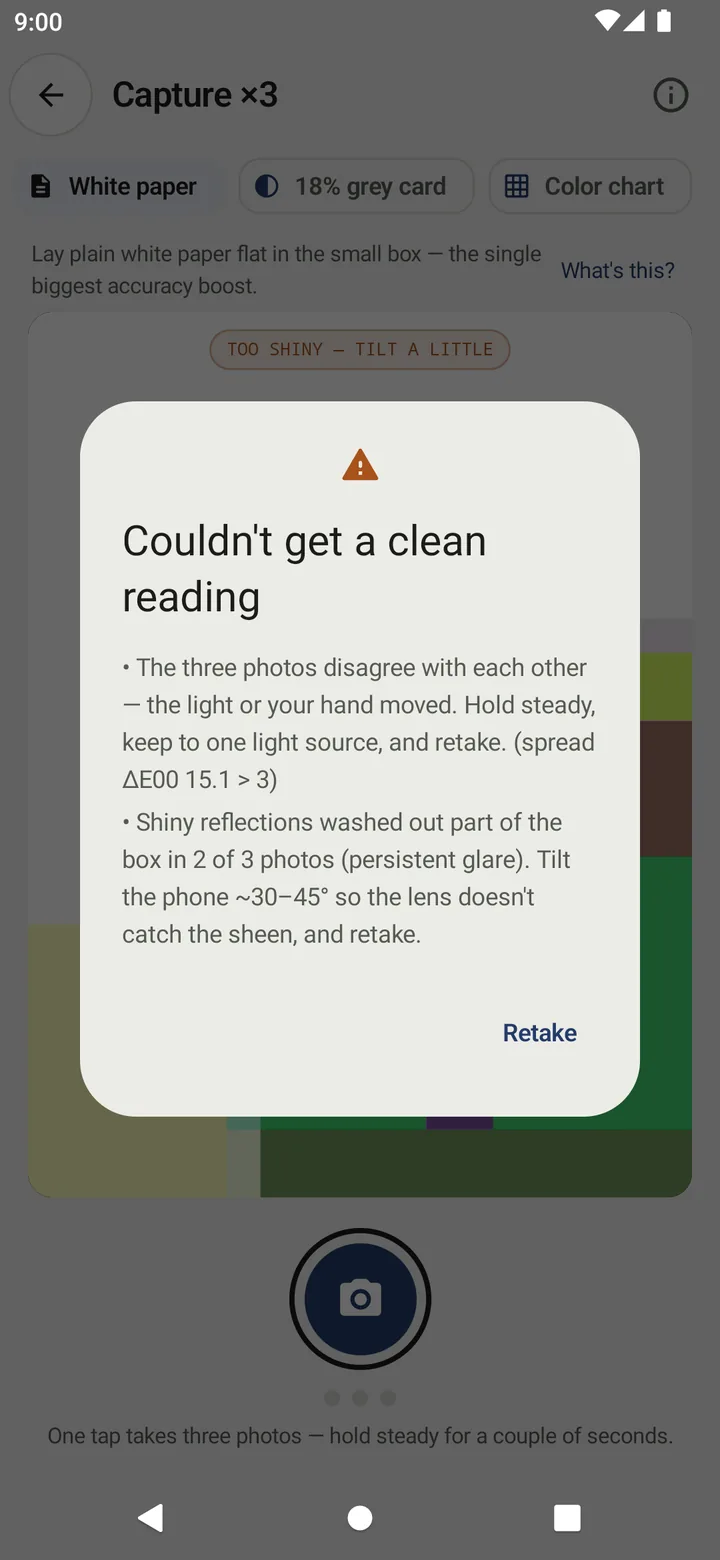
The four reasons for a rejection
1. The three photos disagree
The three photos disagree with each other — the light or your hand moved. Hold steady, keep to one light source, and retake. (spread ΔE00 x.x > 3)
The app compares the three photos with each other. If any two differ by more than ΔE 3, the reading is not stable enough to act on.
Fix:
- Rest your elbows on the table or steady the phone against something.
- Keep the cloth still – no fan or open window blowing it.
- Use one light source. Clouds passing a window, or a flickering tube light, change the light between photos.
- Wait for the status line to finish Photo 3 of 3 — hold steady before moving.
2. Persistent glare
Shiny reflections washed out part of the box in n of 3 photos (persistent glare). Tilt the phone ~30–45° so the lens doesn't catch the sheen, and retake.
Too much of the fabric box is burnt out to white in at least two photos.
Fix: tilt the phone further, move out of direct sun or away from a bare bulb, or pick a less shiny area (the back of satin, a flatter spot of velvet).
3. The reference card is overexposed
The reference card is overexposed in n of 3 photos. Move out of direct light and keep the card flat in the small box.
The white paper or grey card is too bright to use as a reference, so the correction would be wrong.
Fix: move to softer light, make sure the paper is flat (a curled edge can catch a highlight), and keep it inside the small dashed box. A grey card is less likely to overexpose than white paper.
4. The colour chart could not be read (Color chart mode)
The color chart couldn't be read in n of 3 photos — fill the wide box with the chart (dark-skin patch top-left), keep it flat and evenly lit, and retake.
Fix: line the chart up with the grid until the pill shows chart fit instead of align the chart, dark brown patch at the top left, and avoid glare across the patches.
Warnings on a result (HEADS-UP)
Some problems do not stop the result but lower its confidence. They are listed in a HEADS-UP card:
| Warning starts with… | What to do next time |
|---|---|
| Some shine in the box | Use matt, even light; tilt a little |
| Deep shadow inside the box | Check that nothing, including the phone, shades the fabric |
| The area looks uneven | Move to a plain area – no print, fold or mixed light |
| The photos look soft | Hold about 15 cm away and let focus settle |
| Flicker banding seen | Mains LED light is striping the photo – change light or angle |
| This camera couldn't hold its exposure lock | Nothing to fix; this phone cannot lock exposure, so the agreement check is the safeguard |
| Still capture stalled on this camera | The reading came from the lower-resolution preview stream; fine for an average, but restart the app and retry |
| Implausibly high chroma | Possibly a fluorescent or neon dye – treat the match as unreliable |
| The color chart fit was loose | Line the chart up flat, away from glare |
When the camera itself fails
- Camera access is needed to measure the fabric color. Tap Grant camera access and allow it.
- Camera error / Capture failed — please retry. Tap OK and try again. If it says The camera could not be started, another app may be using the camera, or the device may have no usable back camera. Close other camera apps and reopen Shadecard.
If readings keep failing in one place, change the place: most rejections come from light that moves or reflects. See Lighting and framing for a good reading.
Related
Frequently asked questions
Does a rejected capture cost a scan?
No. Scans are only counted when a fresh capture produces a result.
What does spread ΔE00 15.1 > 3 mean?
The three photos differed by up to 15.1 ΔE2000 from each other, far above the limit of 3. Something moved: the light, the cloth or the phone.
Why does my shiny fabric keep failing?
Satin and other lustrous cloth reflect the light straight into the lens. Tilt the phone further (about 30–45°), move out of direct light, and try a less shiny area.
The camera does not start at all. What now?
Check that Shadecard has camera permission, close other apps that may be using the camera, and reopen the capture screen. The error message says if the device has no usable back camera.
Was this article helpful?
Related articles
- Why Shadecard shows no recipe (family only, no close match, whites)No recipe appears when there was no reference card (family only), when no library shade is within ΔE 9, or when the fabric is white or optically brightened. Each has a fix.
- Why two phones read the same fabric differentlyEach phone's sensor and image processing see colour differently. Shadecard corrects with a reference card and locked exposure, but small differences remain: measure a job on one phone.
- Lighting and framing for a good colour readingUse soft indirect daylight from one source, lay the fabric flat, fill the big box with plain cloth, tilt the phone about 30–45° and keep the reference card in the same light.
- Take your first fabric colour reading, step by stepTap Capture dress color, keep White paper selected, lay the paper in the small dashed box and fill the big box with flat fabric, then tap the shutter once and hold still.
Need a hand?
Email us what you see on screen — a screenshot helps — and we'll walk you through it.