Understanding the trichromatic recipe (Y:R:B and % owf)
In short
A Shadecard recipe has two dials: the Y:R:B ratio sets the hue, the % owf sets how deep. Choose the fibre on the result to see the dye class; confirm everything with a lab dip.
On this page
A Shadecard Starting recipe is written as a ratio of three primary dyes – Yellow, Red and Blue – plus a depth in % owf (grams of dye per 100 g of fabric). The ratio decides the hue; the depth decides how pale or deep that hue comes out. Together with the fibre you choose, that is enough to weigh out a first lab dip.
The ratio sets the hue
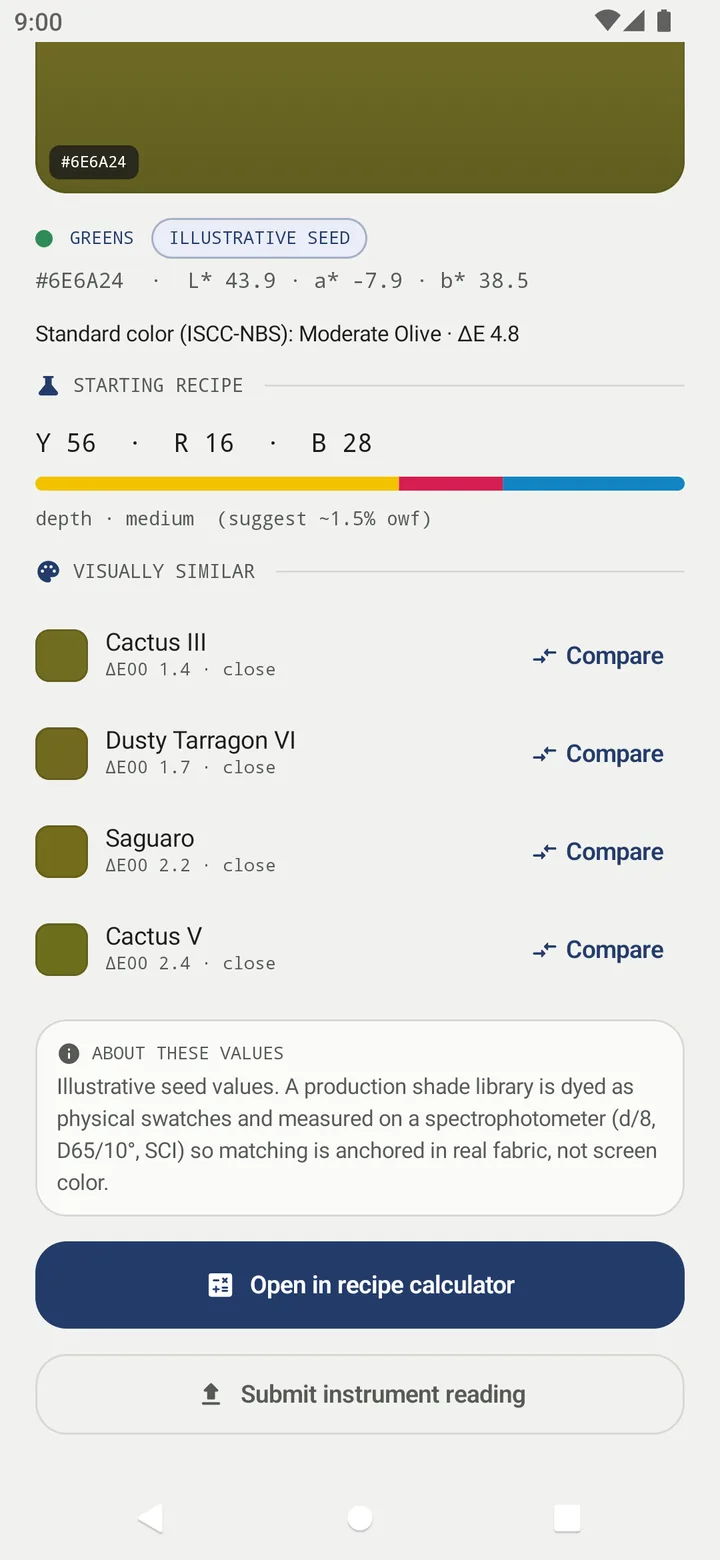
Y 56 · R 16 · B 28 means that of all the dye you use, 56 parts are yellow, 16 red and 28 blue. The coloured bar under the numbers shows the same split. Mixing a yellow, a red and a blue in different proportions reaches most practical shades:
- Mostly yellow and red → oranges, rusts, golds.
- Mostly red and blue → purples, plums, maroons.
- Mostly yellow and blue → greens, olives, teals.
- All three in balance → browns, greys, taupes and near-blacks.
The smallest component usually acts as the complement that dulls (saddens) the colour. The olive above is yellow and blue with a touch of red to mute it.
The depth sets how deep
The same ratio at 0.3% owf gives a pastel; at 3% owf it gives a dark shade of the same hue. On a result, Shadecard estimates depth from your fabric's measured lightness (L*) and writes it out, for example Use about 1.5% of the fabric's weight in dye — a "medium" depth for how dark your fabric reads.
The bands the app uses are pastel (0.1–0.5%), light (0.5–1%), medium (1–2%), dark (2–4%) and very dark (4–8% and more). These are indicative: a strong dye reaches a depth with less, a weak one needs more, and fibres take dye differently. Library pages show a shade's typical depth as suggest ~x% owf; a result uses your own fabric's L* instead.
Fibre and dye class
The camera cannot see what the cloth is made of, but the fibre decides the chemistry. On the result, under Fiber & dye type, choose the fibre from the care label:
| Fibre chip | Dye class shown | Example set the app lists |
|---|---|---|
| Cotton / viscose / linen | Reactive (default) · direct · vat | C.I. Reactive Yellow 145 · Red 195 · Blue 19 |
| Wool / silk | Acid · metal-complex | C.I. Acid Yellow 49 · Red 249 · Blue 62 |
| Nylon | Acid · disperse | as wool/silk |
| Polyester | Disperse (130 °C HT) | C.I. Disperse Yellow 54 · Red 60 · Blue 56 |
| Acrylic | Basic / cationic | C.I. Basic Yellow 28 · Red 46 · Blue 41 |
| Blend | Two-class union dyeing | – (advanced; get the fibre split from the care label) |
The example sets are common trichromats, not a recommendation: use three dyes that your supplier sells as compatible for that class, so they exhaust and fix at similar rates. The ratio itself travels between classes as a starting point; the lab dip with your own dyes shows how far it needs correcting.
Tuning tips: which way to nudge
When your fabric is not exactly on the shade, the result adds Tuning tips such as:
- Your fabric is warmer and yellower — nudge the yellow up a point or two.
- Your fabric is more muted than [shade] — sadden the recipe with a touch of the complement.
- Your fabric is cleaner and brighter — reduce the complement (the smallest component in the ratio).
They point the direction for your first correction; they are not spectral calculations.
Your dip history
After you have logged lab dips for a dye class and shade family (at least three), the result can adjust the recipe to how your process actually behaves and shows Adjusted from your last n dips…. A switch labelled Use my dip history turns this off to show the untouched library recipe. See From recipe to lab dip.
Related
Frequently asked questions
Do the three numbers have to add up to 100?
Library ratios are written as parts that usually total 100, but the calculator accepts any numbers and normalises them automatically.
Which yellow, red and blue dyes should I use?
Three compatible dyes of the class that suits your fibre, ideally a trichromatic set your supplier sells for that class. The app shows an example set per fibre; check the supplier's recommendation.
What does % owf mean?
On weight of fabric: grams of dye per 100 g of dry fabric. 2% owf on 500 g of cloth is 10 g of dye in total.
Does choosing a different fibre change the ratio?
The library ratio stays the same; the fibre sets the dye class and the example dyes shown. Your own dip history is kept per dye class, so corrections learned on cotton are not applied to polyester.
Was this article helpful?
Related articles
- Use the recipe calculator: grams, stock solution or pad liquorEnter fabric weight, depth (% owf), water ratio and the Y:R:B ratio. Pick Weigh (g), Stock (mL) or Pad (g/L); the calculator gives each dye plus bath volume, salt and soda.
- From Shadecard recipe to lab dip: test, log and correctSave the measurement, dye a small swatch from the calculator's stock volumes, measure the dried dip, then Log dip with the outcome and correction. Promote a proven recipe to My shades.
- Shadecard explained: what it does and who it is forShadecard measures a fabric's colour with a phone camera, matches it to a library of 13,297 shades and gives a yellow:red:blue starting recipe to confirm with a lab dip.
- Read your result: L*a*b*, shot spread, ΔE00 match and depthThe result shows your fabric's L*a*b*, how well the three photos agreed (spread), how close the nearest shade is (ΔE00), a Y:R:B starting recipe and a depth in % owf.
Need a hand?
Email us what you see on screen — a screenshot helps — and we'll walk you through it.